


HRV Dashboards for Coaches, Clinicians & Teams: 2026 Comparison


If you work with more than a handful of clients, you already know the problem. Clients collect HRV readings at home, but at the next session you hear "I think it was fine?" or get a camera-roll screenshot of a chart. This guide compares the main HRV dashboards built for professionals: what each one does, what you pay for, and which fits clinicians, coaches, sports teams and researchers.
Quick answer: Most HRV team dashboards are built around one job, a morning readiness check. Elite HRV Teams and Kubios Team Readiness both do that. Optimal HRV does it too, and adds what practitioners who teach breathing need: follow-up lists that update daily, second-by-second biofeedback session detail and resonance frequency (RF) assessments. The dashboard itself is free for coaches, clinicians and organizations.
Disclosure: this guide is published by Optimal HRV. We've kept competitor facts to what each company publishes on its own site (checked November 2026) and linked the sources so you can verify them.
Why screenshots and spreadsheets stop working past a few clients

Most practitioners start the same way. Clients send screenshots, export CSVs, or share an app login. That's fine with three clients. With fifteen, it breaks down:
You can't see who has stopped practicing until they miss a session.
You compare people to population "norms" instead of to their own usual. HRV varies a lot between people, so a "low" number for one client is normal for another.
You can't tell whether clients are getting the most out of their practice. "I did my breathing" doesn't show how the session went.
Your instructions live in emails, separate from the data they refer to.
Research or outcome reporting means copy-pasting from dozens of files.
A dedicated HRV dashboard fixes these by pulling every client's data into one view, automatically.
What a good HRV dashboard should do (checklist)
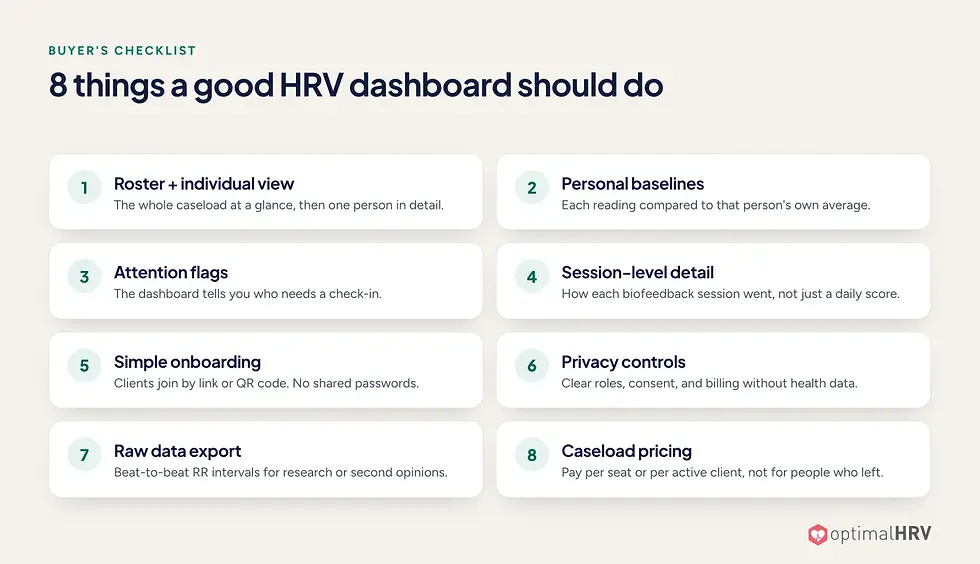
Use this list to evaluate any tool, including ours:
Roster view and individual view. You see the whole caseload at a glance, then drill into one person.
Personal baselines. Each reading is compared to that person's own average, not a population number.
Attention flags. The dashboard tells you who needs a check-in (for example, a drop below usual, or no recent practice) so you don't scan every profile.
Session-level detail. If you prescribe HRV biofeedback, you need more than a daily score; you need to see how each session went.
Simple onboarding. Clients join with a link or QR code, without shared passwords.
Privacy controls. Clear roles, client consent, and billing that doesn't expose health data.
Raw data export. Beat-to-beat (RR interval) export for research or second opinions.
Pricing that matches your caseload. You shouldn't pay for people who left.
HRV dashboards compared


View the comparison as a text table
Optimal HRV | Elite HRV Teams | Kubios Team Readiness | Yudemon Coach | |
Built mainly for | Clinicians, biofeedback practitioners, coaches, sports teams, organizations, researchers | Coaches, trainers, teams, researchers | Sports, corporate wellness, research | Coaches & therapists (breathing) |
Published price | Dashboard free. The organization pays $6.99 per active member / month, or members pay for their own app membership | $30/mo (1–10 active members), $60/mo (11–20), $100/mo (21–100) | $360/yr (≤10), $780/yr (≤25), $1,260/yr (≤50) | $24.99/mo or $179.99/yr (≤10 clients) |
Personal baseline | Own average over 30 days, 3 months, 6 months, 1 year or all time | Trends with custom date ranges | 90-day trends | Not published |
Who-needs-attention flags | Member follow-up, updated daily: Below their usual, Gone quiet, Long quiet, Never started | "Notable changes" card (biggest movers) | Readiness index (0–100%) | Not published |
Biofeedback session detail | Optimal Zone, Low Frequency, Max–Min and Training Efficiency, charted second by second | Not published | Not published | RR interval and spectral analysis per session |
Resonance-frequency assessment | Yes: 8 rates, from 7 down to 3.5 breaths/min (adults) | Pace-finding guide in the app; not on the team dashboard | Not published | Estimated over 5–10 sessions ("Journey Mode") |
Notes the client can see | Yes ("Notes from your care team") | Custom in-app readiness messages | Not published | Not published (coach access is read-only) |
Onboarding | QR code or join link, optional approval | Bulk CSV invite | Invitation keys | Client adds the coach's email |
Raw RR export | Kubios-ready ZIP: per-member CSVs of RR intervals in milliseconds | Raw RR + calculated HRV values | Data export; API is an add-on | Client-side JSON export |
Measurement | Optimal HRV Monitor (optical armband worn on the forearm) or a compatible Bluetooth heart-rate sensor | Bluetooth chest strap or sensor (camera reading is experimental) | Phone held on the chest, or a Polar H10 strap | Bluetooth chest strap |
Sources: elitehrv.com/team-dash, Elite HRV pricing, Elite HRV compatible monitors, kubios.com/hrv-team-readiness, yudemon.com/coach, yudemon.com/app. "Not published" means we didn't find it on the vendor's site, not that the feature definitely doesn't exist.
Readiness monitoring and biofeedback training: which do you need?


These are two different jobs, and many teams and practices need both.
Readiness monitoring is a short resting reading, usually first thing each morning, compared with the person's own baseline. A drop can reflect training load, poor sleep, stress, illness or travel. Coaches read it alongside how the athlete feels to adjust training intensity and recovery. Every dashboard in this comparison supports it, Optimal HRV included.
Biofeedback training means clients actively practice slow, paced breathing at their resonance frequency, to build self-regulation. Clinicians, biofeedback practitioners and coaches use it for stress, anxiety, recovery and performance. What you need to see here is different:
Did they practice? (adherence)
How well did they practice? (session quality, second by second)
Is their pace right? (resonance-frequency assessment)
Optimal HRV covers both jobs in one dashboard: morning readings, breathing sessions and RF assessments for your whole roster. If your athletes or clients also train their breathing, you don't need a second tool.
What you pay for

Pricing models differ a lot, so compare what you actually pay for, not just the headline number:

View the pricing comparison as a text table
Tool | What the coach or organization pays | Members |
Optimal HRV | Dashboard free. If you cover members: $6.99 per active member per month, only for members active that month | Or members pay for their own Optimal HRV app membership, at no cost to you |
Elite HRV Teams | $30, $60 or $100 a month, for up to 10, 20 or 100 active members | Included |
Kubios Team Readiness | $360, $780 or $1,260 a year, for up to 10, 25 or 50 members | Included |
Yudemon Coach | $24.99 a month or $179.99 a year, for up to 10 clients | Clients pay nothing |
What this means for you:
The dashboard costs nothing on its own. Coaches, clinicians and organization admins don't pay for access.
You choose who pays, member by member. Cover a member's subscription yourself, or let them pay for their own membership. You can change this later.
No tiers or seat packs. When you cover members, you're billed only for those who were active that month, so clients who pause or finish a program cost nothing.
Best fit by use case

Clinicians & biofeedback practitioners → Optimal HRV. You assign home practice, and the dashboard shows who practiced, how well, and who has gone quiet. Practitioner notes appear on the client's own dashboard.
Coaches & sports teams → Optimal HRV, Elite HRV Teams or Kubios. All three track morning readiness against each athlete's own baseline. Optimal HRV adds breathing and recovery training, follow-up lists that update daily, and the option for athletes to pay for their own membership.
Corporate wellness & organizations → Optimal HRV or Kubios. Look for department or cohort grouping and billing that doesn't expose individual health data. Optimal HRV's billing roster shows only name and email.
Academic & clinical researchers → Optimal HRV, Elite HRV or Kubios. All three export data. Optimal HRV's export is a Kubios-ready ZIP with per-member CSVs of RR intervals in milliseconds, and cohorts can join by QR code.
How client monitoring works in Optimal HRV


Create your organization and groups. Set them up as caseloads, teams, departments or private groups.
Share a QR code or join link. Clients join from their phone, and you can require approval before they join. You choose whether the organization or the member pays.
Clients practice; you see the trends. Readings, Biofeedback, Mindfulness and RF assessments sync automatically. Member follow-up updates daily with who dropped more than 15% below their usual and who has gone quiet, so your check-in list stays short.
FAQ
What is an HRV dashboard?
An HRV dashboard is a web app that collects heart rate variability data from many people's apps and sensors into one view. Coaches, clinicians and researchers use it to track trends, spot who needs attention, and review sessions without asking for screenshots.
Do my clients need their own HRV monitor?
For Optimal HRV, yes. Each client needs a Bluetooth heart-rate sensor that sends beat-to-beat (RR interval) data, such as the Optimal HRV Monitor (an armband worn on the forearm) or a chest strap like the Polar H10. Some readiness apps measure without a sensor: Kubios can use the phone held on the chest. Those work for a resting reading but not for live biofeedback. Oura shares only summary HRV with other apps, and Apple Watch doesn't stream beat-to-beat data live. See compatible monitors →
What is a good HRV score for a client?
There's no universal "good" number. HRV depends on age, fitness, genetics and how it's measured. That's why the better dashboards compare each person to their own baseline. Optimal HRV compares each person to their own average over 30 days, 3 months, 6 months, 1 year or all time.
Which HRV app is best for coaches?
Look for four things: personal baselines, flags for who needs attention, session-level detail and raw data export. Optimal HRV covers morning readiness and breathing training in one dashboard, and the dashboard is free for coaches.
Can I export raw HRV data for research?
Elite HRV, Kubios and Optimal HRV all offer exports. Optimal HRV exports a Kubios-ready ZIP with one CSV of RR intervals (in milliseconds) per activity for each member.
Do I pay for clients who stop using the app?
No. The dashboard is free. If your organization covers members, you pay $6.99 only for each member who was active that month. Members can also pay for their own membership, at no cost to you.

